7:00 — the crew clocks in
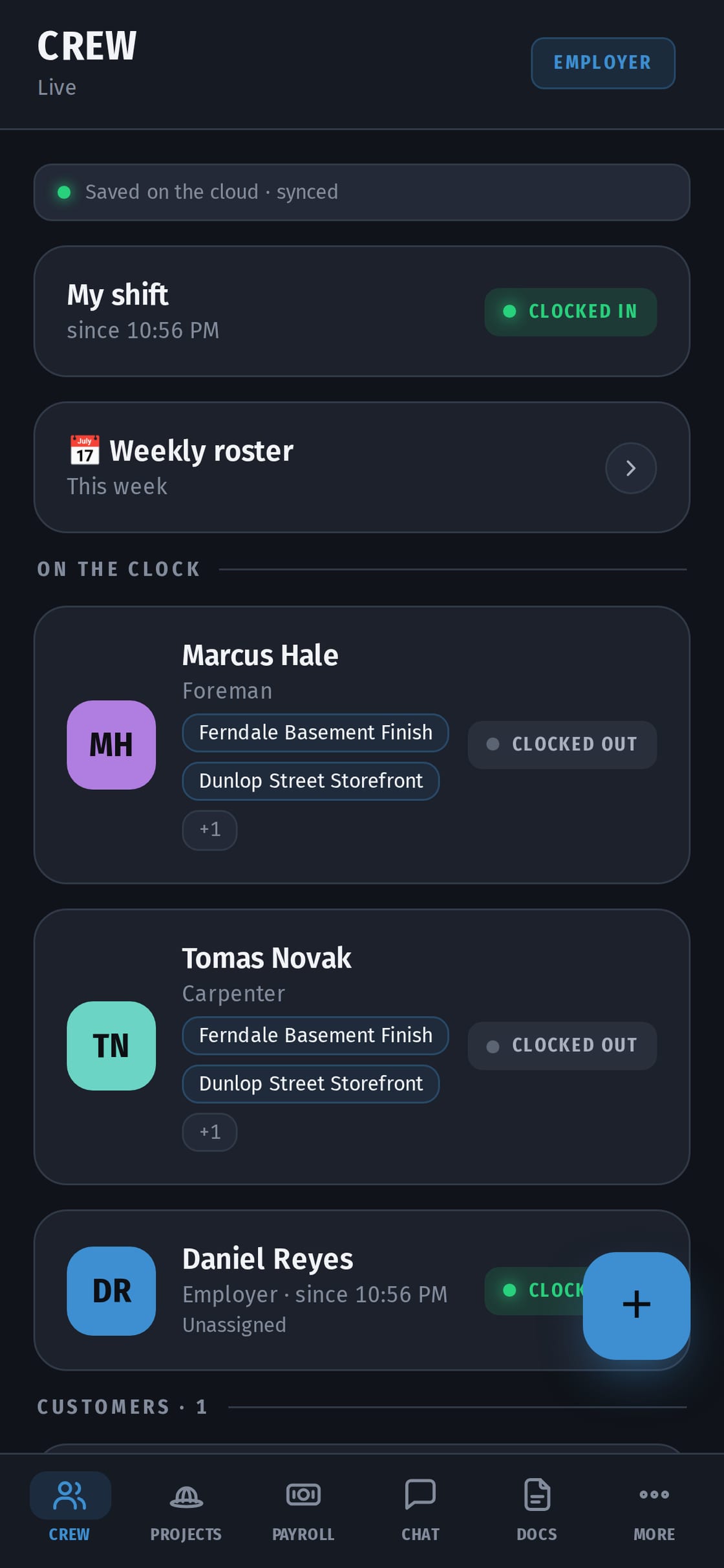
Your crew open CrewHub on site and tap Clock in. The app checks they're at the job, picks the right one, and you see it on the Crew screen: who's on the clock and where. No "I'm here" texts, no guessing.
10:00 — the client asks for extra work
The client wants two more outlets. You add a quote from your phone — line by line, HST added for you — and send it. They tap Approve on their own phone. An approved quote can't be changed, so there's no argument later about the price.
13:00 — a receipt from the supply store
Snap the receipt, it goes on the job, and it counts against the job's budget. At the end it can go straight onto the invoice.
16:00 — the crew clocks out
The hours are already counted. No paper timesheets, no chasing anyone on Friday.
Friday — payroll in minutes
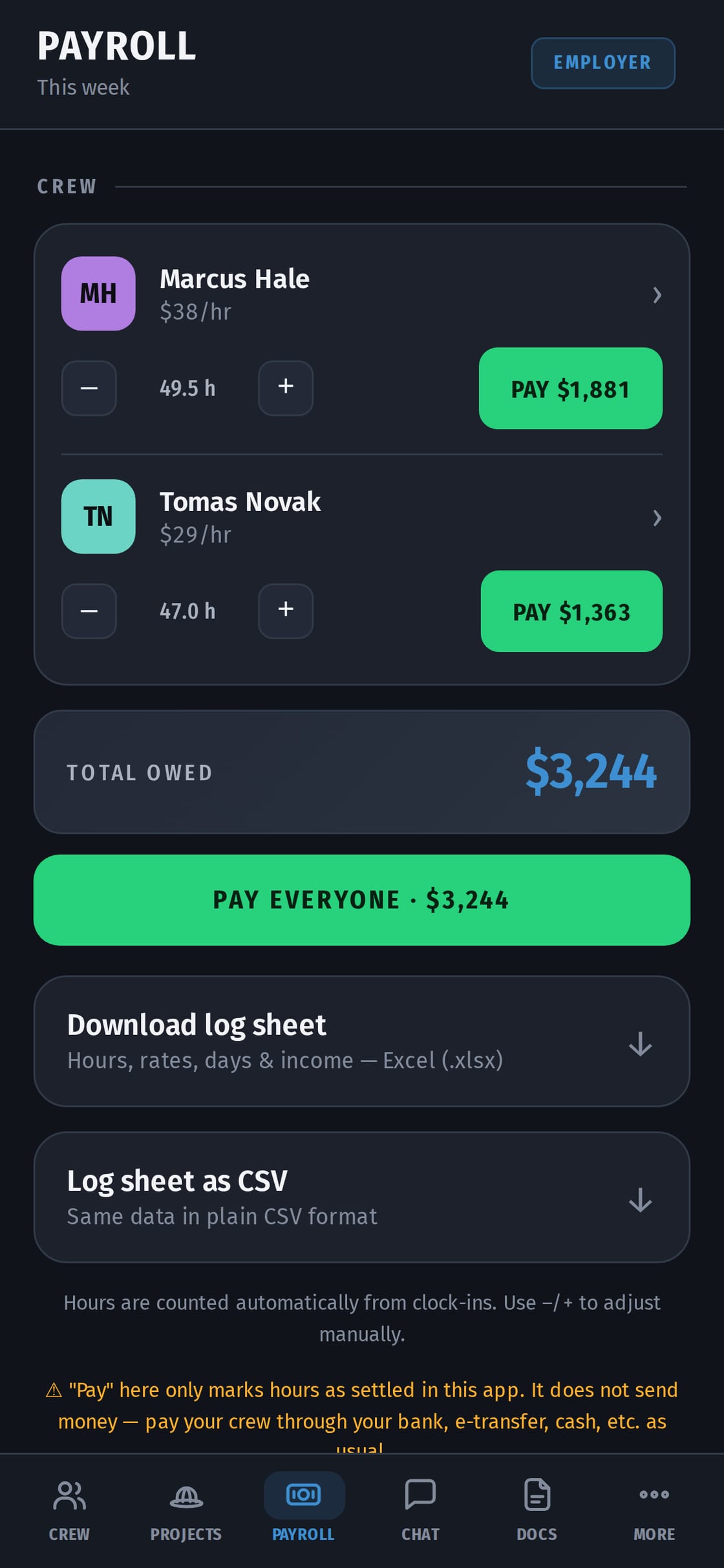
Payroll shows each worker's hours × their rate. Pay them the way you always do — bank, Interac e-Transfer, cash — and tap Mark as paid. Your bookkeeper gets one Excel file.
End of the job — the invoice
Hours and receipts pull in, HST is added, the invoice goes out as a PDF or a link. If it isn't paid, send a reminder.
What you don't have to do
Install anything on a computer, buy special phones, or pay for every worker: one price for the whole crew, from $14.99 CAD a month. Your crew can use the app in English, Ukrainian, Spanish, French or Russian.
Getting started
- Sign up on crew-hub.ca. Business name, email, password. 14 days free, no card.
- Add your first job. The address sets the zone the crew clocks in at.
- Invite your crew. Send the invite link by WhatsApp or text. On an iPhone they get the CrewHub app from the App Store and join with your company code. On any other phone they open it in the browser.
- Set each person's rate. Add overtime, allowances or deductions if you pay them.
- First shift. The crew taps Clock in on site. A "first steps" card on your home screen walks you through it.
Crew and hours
- Clock in on site. One big button. While the shift is on, CrewHub records only one of three things: on site, nearby, or left. Nothing is recorded outside the shift, and a worker can clock in without sharing location.
- Works with no signal. The clock-in is saved on the phone and sent when there's signal again.
- Forgotten clock-outs. The worker adds the time they left, and you confirm it.
- A calendar for each person. Blue days aren't paid yet, green days are paid. Red days need you: a forgotten shift, an overlap, a clock-in outside the zone. Each red day says why and has a Confirm day button.
- Weekly schedule and time off. Who's on which job each day. Time-off requests come to you to approve.
Quotes, invoices and getting paid
- Quotes with HST. Line by line, with sub-items under a line ("remove floor · haul away · underlay"). HST is worked out per line, to the cent.
- Approved from the client's phone. An approved quote can't be edited. If the job changes, you send a new version and the client approves it again.
- Quote to invoice in one tap. The same lines, plus the crew's hours and the receipts for materials. The invoice goes to the client by email from your company name, as a PDF with your logo.
- Payments from the client. The client marks "I've sent it", you confirm, and the job balance updates.
Payroll
- Hours come from the clock-ins, times each person's rate.
- Overtime, allowances and deductions are set per person.
- The rate is fixed on the shift, so a raise doesn't rewrite past weeks.
- Pay one person or the whole crew, in full or in part, and tap Mark as paid.
- One Excel or CSV file for your bookkeeper: hours, rates, payments, income and HST collected.
Jobs
- Photos. Albums with captions, date and time. They can be seen with no signal.
- Tasks and stages. The client signs off a finished stage, or asks a question about it.
- Budget. Spent on labour and materials against the job's budget.
- Job chat and direct messages. Photos and voice messages in one place, instead of three WhatsApp groups.
What your client sees
A client page with:
- how far along the job is;
- photos;
- stages to sign off and quotes to approve;
- invoices as PDF and the balance;
- a chat with you.
Clients join free. What your client sees →
On your phone and your computer
- The iPhone app is in the App Store, and CrewHub also works in any phone's browser.
- On a computer you get a wide layout: a menu on the left, payroll and documents as tables, "Needs attention" on the home screen, and chat in two columns.
- Everyone picks their own language: English, Ukrainian, Spanish, French or Russian.
What CrewHub doesn't do
- It doesn't move money. Mark as paid is a record. You pay the way you always do: bank, Interac e-Transfer, cash.
- It doesn't withhold CPP, EI or income tax. Your bookkeeper or payroll service does that, from the Excel file.
- It doesn't track anyone outside a shift.
What it costs
One price for the whole crew, not per person. Every plan has every feature:
- Solo — C$14.99 a month (just you);
- Starter — C$34.99 (up to 3 workers);
- Growth — C$49.99 (up to 7 workers);
- Crew — C$79.99 (up to 15 workers);
- bigger crew — talk to us.
14 days free, no card.